
Download TARGOBANK – mobile banking, online banking, bank app, financial management, banking app, mobile app, digital banking, TARGOBANK app, bank transactions, financial tools, online money transfer, account management, mobile finance, digital wallet, online banking app, secure banking, financial services, mobile banking app, online banking tools, mobile money transfer
Overview
TARGOBANK has introduced a dedicated mobile application designed to streamline banking operations for users who prefer managing their finances on the go. The software serves as a digital extension of the bank’s online platform, enabling users to access their accounts, perform transactions, and monitor financial activity from Android devices. It is particularly useful for individuals seeking convenience and real-time control over their financial accounts without visiting a physical branch.
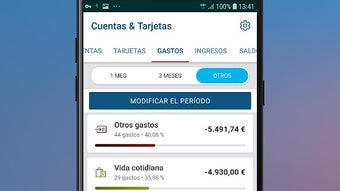
The app supports core banking functions such as viewing account statements, tracking recent transactions, and managing budgets through the My Budget service. Users can also transfer funds between accounts or to third parties, buy and sell shares, and access stock market information. Additional functionalities include document retrieval via DVI, user authentication using fingerprint, and the Multiuser feature for quick access to multiple accounts.
Designed for both personal and professional users who rely on digital financial tools, the app integrates seamlessly with the existing TARGOBANK online infrastructure. It allows users to schedule appointments with bank representatives, locate nearby branches and ATMs, and access customer service contacts. The application is free to download and use, with login credentials shared across the web and mobile platforms.
Key Features & Capabilities
- Account Access & Management: Users can view balances, check transaction history, and manage multiple accounts through a secure login process using existing website credentials.
- Fingerprint Authentication: Enhanced security through biometric login, allowing faster and more secure access without repeatedly entering passwords.
- My Budget Service: A built-in tool to track income and expenses, helping users maintain financial discipline and plan their spending.
- Money Transfers: Facilitates transfers between linked accounts and to external beneficiaries, supporting both instant and scheduled transactions.
- Investment Tools: Enables users to buy and sell shares and access real-time stock information directly within the app.
- DVI Functionality: Allows retrieval and viewing of account statements and other official documents securely.
- Branch & ATM Locator: Integrated maps to find nearby TARGOBANK branches, ATMs, and office contact details.
- Customer Support Access: Direct links to customer service numbers and a feature to send feedback or comments.
- Multiuser Feature: Supports quick switching between multiple user profiles for different accounts, improving usability for families or business users.
These capabilities make the app ideal for daily financial monitoring, transaction execution, and long-term financial planning. The integration of investment tools and budget tracking transforms it into a comprehensive financial management utility for mobile users.
User Interface, Workflow & Performance
The user interface of the TARGOBANK app is designed with clarity and ease of navigation in mind. The main dashboard presents key account information at a glance, with clearly labeled sections for transactions, balances, and quick actions. Menus are logically organized, and common tasks such as transfers or checking statements are accessible within a few taps.
Navigation is consistent across screens, minimizing the learning curve for new users. The app’s workflow prioritizes efficiency, allowing users to complete tasks like fund transfers or document retrieval in minimal steps. Biometric login enhances both speed and security during access.
Performance details were not specified by the developer. However, based on general behavior of mobile banking applications, the app is expected to operate smoothly on supported Android devices. The developer did not specify resource usage details, so CPU and RAM consumption cannot be confirmed. Stability is likely maintained through regular updates, though exact performance metrics are not available.
Compatibility & System Requirements
The TARGOBANK app is compatible with Android operating systems and is available for download on the Google Play Store. The current version is 5.0.0, with a file size of 48.8 MB, indicating a relatively lightweight installation.
Exact system requirements were not listed. However, since the app is designed for modern Android devices, it likely supports devices running Android 6.0 (Marshmallow) or later. The developer did not provide additional system requirements, so users should ensure their device meets general Android compatibility standards.
Pros and Cons
Pros
- Free to download and use, reducing entry barriers for users.
- Seamless integration with the TARGOBANK online platform and existing credentials.
- Biometric authentication enhances security and convenience.
- Comprehensive set of financial tools including budgeting and investment tracking.
- Multiuser support improves usability for households or small businesses.
- Offline access to recent transactions and documents via cached data.
- Extensive customer support features, including appointment scheduling and branch locators.
Cons
- Available only for Android devices, limiting access for iOS users.
- Exact performance and hardware requirements were not specified.
- Limited functionality outside of TARGOBANK’s ecosystem.
- Dependent on internet connectivity for real-time data and transactions.
- May require periodic updates to maintain compatibility with new Android versions.
FAQ Section
Is the TARGOBANK app available for iOS devices?
The app is currently available only for Android devices. No information was provided regarding an iOS version.
Is the app safe to use?
Yes, the app uses secure login methods, including fingerprint authentication, and leverages the same security protocols as the TARGOBANK website. Users are advised to keep their device and app updated.
How often are updates released?
Regular updates are likely, as is standard for banking applications. However, the frequency of updates was not specified by the developer.
Does the app require a license or subscription?
No, the app is free to download and use. There are no subscription fees or licensing requirements.
Can I use the app without an internet connection?
Basic features such as viewing cached transaction history and documents may be accessible offline. However, real-time data and transaction processing require an active internet connection.
Final Thoughts + CTA
The TARGOBANK mobile application delivers a robust and user-friendly experience for managing personal and business finances on Android devices. With its secure login, intuitive interface, and wide range of features—from budgeting and investing to branch locating and customer service—it stands out as a comprehensive digital banking solution.
While it is limited to Android and lacks detailed system requirements, its core functionality is well-structured and practical for everyday use. The inclusion of biometric authentication and the Multiuser feature adds significant value for users seeking both security and convenience.
For individuals and small business owners who rely on mobile banking tools, TARGOBANK offers a reliable and efficient platform to manage financial activities anytime, anywhere.
Download TARGOBANK now







